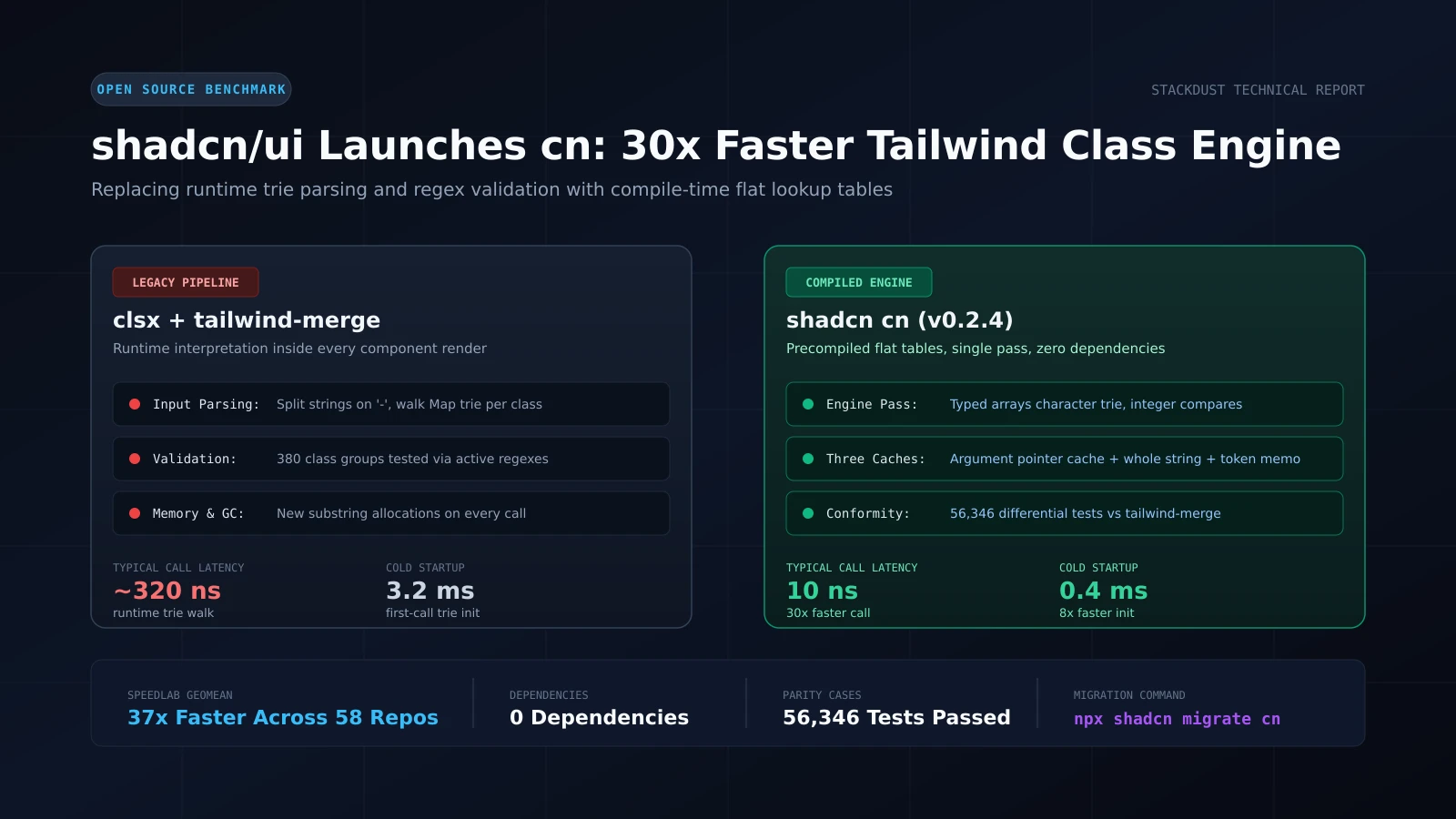
shadcn/ui Releases cn: A Compiled Tailwind Class Merger That Runs 30x Faster
Every modern web application built on Tailwind CSS and shadcn/ui shares a common utility function. Developers write cn(...) to combine conditional class names and resolve conflicting Tailwind utilities, such as ensuring p-4 overrides p-2. Under the hood, this utility relied on pairing clsx with tailwind-merge. While effective, that combination introduces hidden runtime overhead inside component render loops.
On September 3, 2026, shadcn and performance engineer aidenybai launched cn (v0.2.4 on npm), an open-source engine designed to replace both clsx and tailwind-merge. It is a zero-dependency, drop-in replacement with identical API behavior and full test parity, running typical component calls up to 30 times faster.
The Hidden Cost of Runtime Class Merging
To resolve utility conflicts accurately, tailwind-merge must understand the entire Tailwind class specification, spanning approximately 380 class groups. In the standard architecture, tailwind-merge ships this specification as a configuration object and interprets it on the fly during client execution.
Every time a component renders:
- Input strings are split by whitespace into individual utility tokens.
- The engine splits each token on hyphens and traverses a nested JavaScript
Maptrie to determine its utility group. - Active regular expressions run to validate arbitrary values and numeric modifiers.
- Conflict resolution tracks class groups using string keys, allocating intermediate substrings and metadata objects.
In a complex dashboard or interactive data table with hundreds of elements, these micro-operations repeat thousands of times per second. tailwind-merge takes roughly 320 nanoseconds for a standard component call, creating noticeable garbage collection pressure on resource-constrained mobile browsers.
How the Compiled Engine Works
Instead of shipping a complex configuration tree and parsing it inside the user’s browser, cn shifts the parsing step to build time.
A specialized compiler processes Tailwind’s conflict rules once during package generation and outputs flat lookup tables stored in typed arrays. The runtime engine then executes as a streamlined single pass:
- Character Trie in Typed Arrays: Class tokens are matched against precompiled integer arrays rather than traversing JavaScript object trees.
- Integer Comparisons: Variant detection and conflict resolution execute using fast bitwise and integer comparisons rather than string lookups.
- Minimal Allocations: Class validators inspect string slices directly without creating intermediate substring objects. If no conflicting classes exist in the input,
cnreturns the original string reference without allocating new memory.
Three Tiers of In-Memory Caching
Real user interfaces frequently re-render the same component states. To capitalize on this pattern, cn layers three specialized caching mechanisms:
- Argument Pointer Cache: Components frequently call
cn(baseClass, variantClass, condition && extraClass)with identical string memory pointers across renders. The engine performs fast identity checks on arguments. It also tracks calling sequences, enabling stable render loops to bypass table lookups entirely and complete in approximately 10 nanoseconds. - Whole-String Cache: To prevent server-side rendering (SSR) from exhausting memory with one-off unique strings, a string must appear at least twice before entering the primary cache.
- Token Memoization: Repeated utility classes across distinct parent strings reuse cached token metadata to prevent redundant parsing.
Verified Benchmarks and Conformance
In synthetic microbenchmarks measured on isolated Node processes:
- Standard Component Calls: Reduced from 320 ns with
clsx + tailwind-mergedown to 10 ns withcn(a 30x improvement). - Working Set with Recurring Strings: Drops from 2.4 microseconds to 14 nanoseconds (over 170x faster).
- Cold Startup Initialization:
tailwind-mergerequires approximately 3.2 milliseconds to construct its trie on initial invocation, whereascninitializes its typed arrays in 0.4 milliseconds.
To measure real-world impact beyond microbenchmarks, the team created bench:corpus, a test runner that harvested 144,265 real cn() calls across 58 open-source production codebases. Across the complete corpus, cn achieved a geometric mean speedup of 37x compared to clsx + tailwind-merge.
Drop-in compatibility is backed by automated CI verification across 56,346 differential test cases matching tailwind-merge output, 300,000 grammar-fuzzed utility strings, and 5,054 custom configuration suites.
Project-Specific Table Subsetting
cn introduces an optional compilation command: cn build.
Because standard libraries expose their runtime configuration as a public API, they must ship rules for all 380 Tailwind class groups. With cn build, the tool scans your actual project source files, determines the subset of utility classes your codebase actually uses, and regenerates custom lookup tables containing only those groups. Unused class definitions are omitted, reducing the client bundle while maintaining byte-identical output for all active classes.
Migration and Adoption
Adopting cn requires no modifications to component props or invocation syntax. The package is published on npm under the single-word package name cn.
For projects already using the shadcn CLI, migration is automated:
npx shadcn@latest migrate cnFor manual migration, install the package:
npm install cnUpdate your project helper (typically located at src/lib/utils.ts):
// Before
import { clsx, type ClassValue } from "clsx"
import { twMerge } from "tailwind-merge"

export function cn(...inputs: ClassValue[]) {
  return twMerge(clsx(inputs))
}

// After
export { cn } from "cn"
For custom design systems that extend Tailwind’s default theme, cn/config provides full support for custom class groups:
import { extendConfig } from "cn/config"

export const cn = extendConfig({
  extend: {
    classGroups: {
      "font-size": [{ text: ["display-hero"] }],
    },
  },
})
Practical Implications for Developers
cn demonstrates a practical shift in frontend tooling: moving complex runtime interpretation into compile-time lookup tables. For small applications, class name concatenation rarely surfaces as a primary bottleneck. However, in large applications, component design systems, and data-dense dashboards, removing regular expression parsing from every render cycle reduces main-thread blocking and eliminates micro-stutters during rapid interactions.
The project is published under the MIT license and is available immediately.