BentoPDF Now Edits PDF Text in the Browser — and Its Container Is Just an nginx
Every few months you need to do something unglamorous to a PDF — merge two, strip a page, compress it under an upload limit, sign it. And every few months you paste it into whichever advertising-funded website ranks first for “merge pdf”, which means handing a document you did not read carefully enough to a server you know nothing about.
BentoPDF is the answer to that, and on 29 August 2026 it shipped v2.8.8 — the release that adds editing the actual text inside a PDF. That is the reason to write about it today. The reason it is worth self-hosting is older and more structural, and you can verify it in about a minute by reading the Dockerfile.
What It Is
A PDF toolkit that runs in the browser. Merge, split, rotate, compress, OCR, convert, sign, redact — the usual matrix — plus, as of this release, in-place text editing.
The project describes itself as “The Privacy First PDF Toolkit”, and the README is unambiguous about the mechanism: “All processing happens in your browser. Your files are never uploaded to a server, guaranteeing 100% privacy.” Marketing copy like that is normally where an article should get suspicious. In this case the claim is checkable, and it checks out — see “How It Works”.
The numbers: 14,932 stars, first commit October 2025, last push 29 August 2026. Licensed AGPL-3.0 with a real LICENSE file, not a badge. Maintained by an individual, not a company — GitHub reports the owner as a user account, and the v2.8.8 notes read like one person’s changelog, including the line “This was arguably the hardest feature I had built so far.”
Why You Have Not Heard Of It
Because Stirling-PDF exists and has 90,905 stars. It has occupied the “self-hosted PDF tools” slot in everyone’s head since 2023, it is what every homelab thread recommends, and it is genuinely good. When a category has an incumbent that large, a ten-month-old project with a sixth of the stars is invisible regardless of merit.
The second reason is that BentoPDF does not look like infrastructure. It has a public website that works without signing up, so most people who encounter it use the hosted instance and never notice there is a container.
How It Works
Here is the part you can verify yourself. The Dockerfile is a two-stage build: a node:20-alpine builder produces a dist/ directory, and the runtime stage is nginx-unprivileged:alpine-slim with one meaningful instruction:
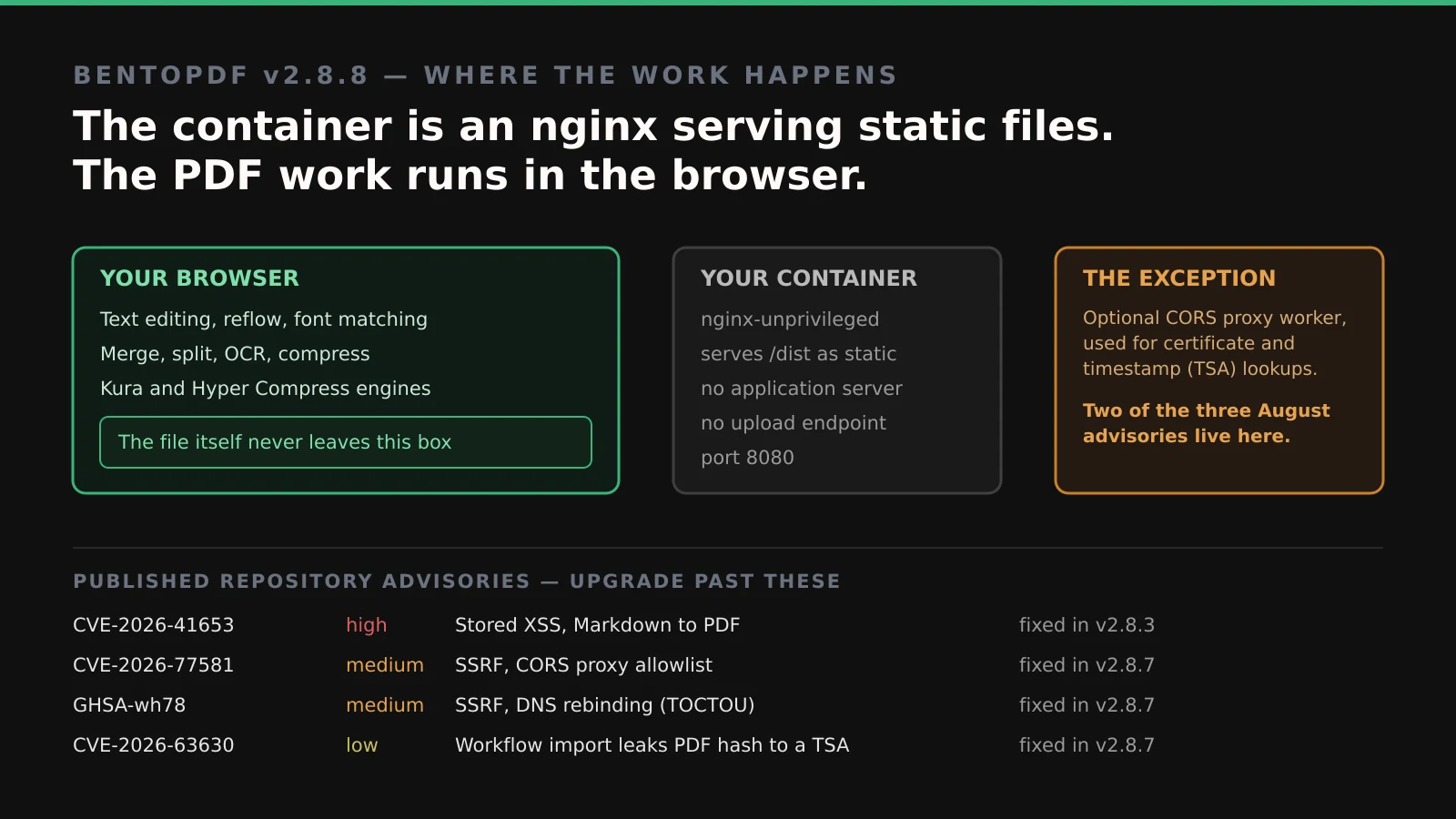
COPY --chown=nginx:nginx --from=builder /app/dist /usr/share/nginx/html${BASE_URL%/}That is the whole server. There is no application runtime in the final image, no queue, no worker, no upload handler — an nginx serving static assets on port 8080. The PDF work happens in WebAssembly in the visitor’s browser, which is why the privacy claim is structural rather than a promise: a server with no endpoint that accepts a file cannot receive your file, whatever its privacy policy says.
This is the opposite of Stirling-PDF’s design, which does the work server-side in Java. Neither is wrong. Server-side processing gives you consistent results independent of the client and handles files too large for a browser tab; client-side processing means the document never moves. They are different trust models, and it is worth knowing which one you have deployed.
The 2.8.8 text editing is the interesting proof of that model. Click a paragraph and type; text reflows live, fonts are matched, and it supports bold/italic, alignment, lists, find-and-replace, spell-check with a personal dictionary, and left-to-right and right-to-left text. All of it in the tab. One documented constraint: local font access works only on Chromium-based browsers, because the Local Font Access API is not available elsewhere.
The release also ships two compression engines, Kura and Hyper Compress. The project reports benchmarking Hyper against Ghostscript, MuPDF and qpdf across 2,104 real-world PDFs and 27,352 engine runs, claiming a 0.39% corruption rate — “the lowest of any engine measured” — and a monotonic guarantee that it never returns a file larger than the original. Treat those figures as what they are: the project’s own benchmark of its own engine, published in its own release notes and not independently reproduced. The methodology is described and the engine is open source, so the claim is falsifiable — but it has six stars and was pushed yesterday, so nobody has falsified it yet either way.
Running It
The compose file in the repository is four lines of substance:
services:
  bentopdf:
    image: ghcr.io/alam00000/bentopdf-simple:latest
    container_name: bentopdf
    restart: unless-stopped
    ports:
      - '8080:8080'
Note the image name. The repository publishes two, and the compose file’s own comments spell out the difference:
Self-Hosted build - ghcr.io/alam00000/bentopdf-simple:latest
Commercial build  - ghcr.io/alam00000/bentopdf:latest
bentopdf-simple is the one you want. Per the project’s description it carries “every PDF tool the public site has, without the BentoPDF marketing (no hero, FAQ, testimonials, footer)” — the tools are identical; what is stripped is the landing page. That is a refreshingly honest split, and worth contrasting with the licence seam we found in Pangolin’s AI gateway last week, where the open build’s analytics module was a stub with empty function bodies. Here the self-hosted build is functionally complete.
There is a commercial licence — a stated $79 one-time purchase — but it buys relief from AGPL obligations for people embedding BentoPDF in proprietary products. It does not gate features for self-hosters.
Because there is no application server, there is also no database, no environment file, and nothing to back up. Put it behind whatever reverse proxy you already run and you are done.
What It Replaces
Directly: the free PDF websites. That is the honest pitch, and it is a good one.
Against Stirling-PDF, the comparison is architectural rather than feature-for-feature. Stirling-PDF has a wider tool surface, a much larger community, and server-side processing that does not care how old the client device is. BentoPDF has the trust model — and a much smaller operational footprint, since a static-file container is closer to zero maintenance than a JVM service.
If you handle documents that are genuinely sensitive — contracts, medical records, anything where “it was processed on a server” is a question you would have to answer — the client-side model is the one that lets you answer it cleanly.
Limitations
The security record deserves a full paragraph, not a footnote. The repository has four published security advisories, and if you are pinning an image tag you need to know about them:
| Advisory | Severity | Issue | Fixed in |
|---|---|---|---|
| CVE-2026-41653 | High | Stored XSS in the Markdown-to-PDF tool | v2.8.3 |
| CVE-2026-77581 | Medium | SSRF via hostname-allowlist bypass in the CORS proxy worker | v2.8.7 |
| GHSA-wh78-rcw2-hhg9 | Medium | SSRF via DNS rebinding (TOCTOU) in the same worker | v2.8.7 |
| CVE-2026-63630 | Low | Workflow import trusts an attacker-supplied TSA URL | v2.8.7 |
Two things about that table. First, three of the four were published on 23 August 2026 and the affected range is listed as bentopdf and bentopdf-simple <= 2.8.6 — so a self-hosted deployment pinned to an older tag is in scope, not just the public site. Handling this well is a point in the project’s favour: it credited the reporters by name and shipped v2.8.7 as an explicit security release.
Second, and more practically: at the time of writing these advisories resolve on the repository but not in GitHub’s global advisory database — querying them there returns 404. That is consistent with an open coordinated-disclosure window, and it means automated dependency scanners will not necessarily surface them for you. Watch the releases page rather than relying on a scanner.
The low-severity one is the most interesting for a tool built on a privacy claim. Importing a crafted workflow file could make the app send an RFC 3161 timestamp request — containing a SHA-256 hash of your PDF — to an attacker-chosen server. Not the document, but a fingerprint of it, which is enough to confirm to a third party that you hold a specific file. It is a small, precise dent in “nothing leaves your browser”, and it is exactly the shape of bug this architecture will keep producing: the core is sealed, so the risk migrates to the few features that must talk to the network. That is also why the optional CORS proxy worker — used for certificate and timestamp lookups — accounts for two of the three August advisories.
Two lighter limits. This is one maintainer’s project; a bus factor of one is a real consideration for something you deploy for a team. And browser-side processing has a ceiling — a several-hundred-megabyte scanned PDF is a different experience in a tab than in a JVM.
Who It Is For
Anyone who currently pastes PDFs into websites. Deploy bentopdf-simple, bookmark it, stop doing that.
Small teams handling client or patient documents, where the client-side model is the difference between a compliance conversation and a short answer. Pin a tag, watch the releases page, and be on v2.8.7 or later.
Not for you if you need a wide server-side pipeline, batch automation against enormous files, or the reassurance of a large maintainer team. Stirling-PDF remains the better answer there.
Conclusion
The headline feature is real — editing PDF text in a browser tab with live reflow and font matching is genuinely hard, and the maintainer says as much. But the reason to run this rather than use it is in the Dockerfile: the thing you deploy is an nginx with a folder of static files, and a server that cannot accept an upload cannot leak one.
That guarantee is architectural, which makes it worth more than a privacy policy. It is also not total — read the four advisories, note that two of them live in the one optional component that does make outbound calls, and run v2.8.7 or later. The interesting security surface of a client-side app is always the small part that is not client-side.