Pangolin Quietly Became an AI Gateway — and the Licence Seam Is Visible in the Source
If you know Pangolin at all, you know it as the WireGuard-based tunnelled reverse proxy people put in front of their homelab — the self-hosted answer to Cloudflare Tunnel. On 27 August 2026 it shipped version 1.22.0, and the headline feature is not networking at all. It is an AI gateway: one authenticated endpoint sitting in front of both commercial model APIs and the model servers running on your own hardware.
That is worth a look on its own. But the more useful thing about this release is what you find when you stop reading the changelog and start reading the licence headers.
What It Is
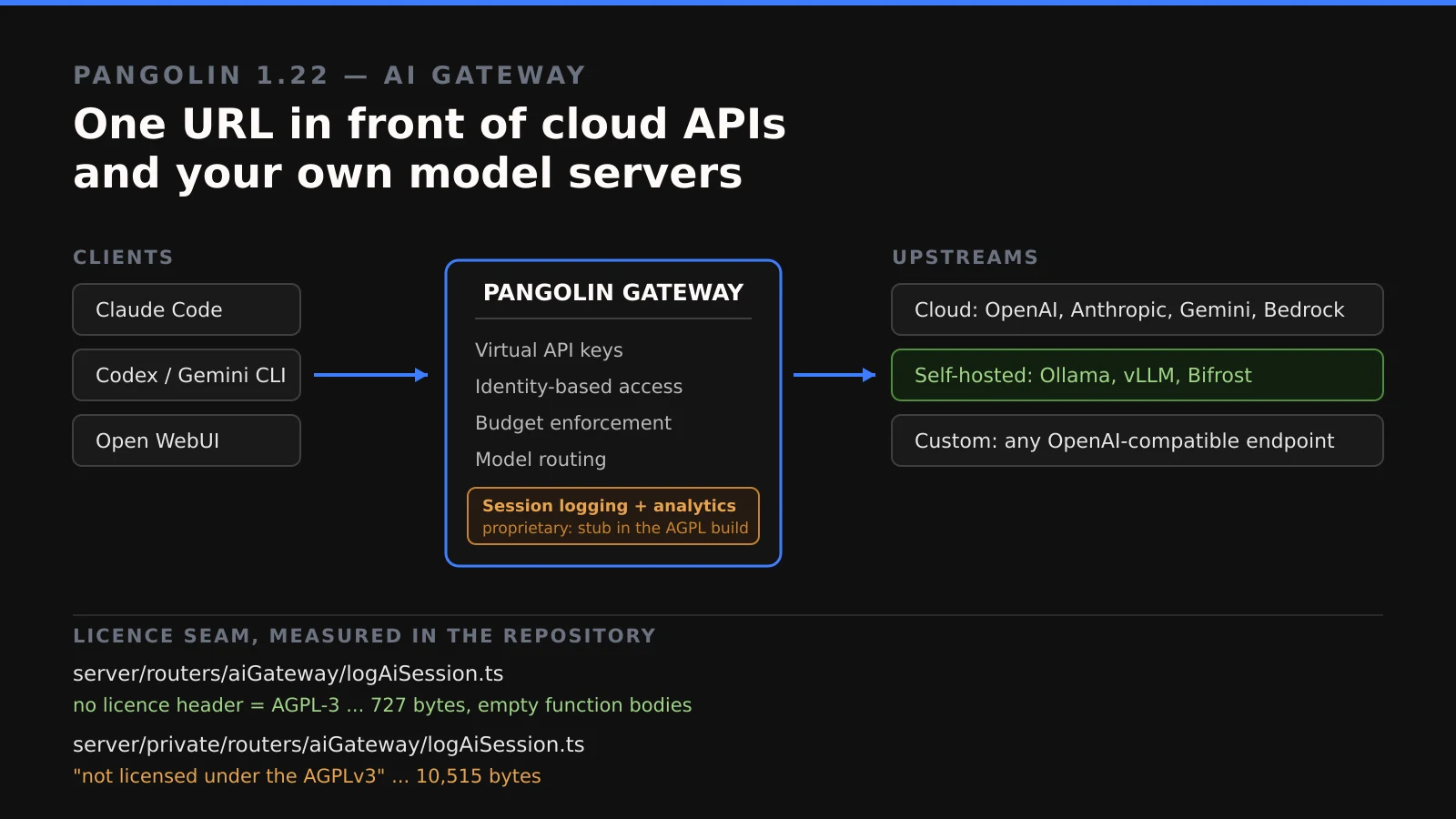
The AI gateway is, in the project’s own description, an identity-aware proxy in front of both public cloud APIs and self-hosted model servers. Your coding agent talks to a single Pangolin URL instead of holding credentials for five different providers. Pangolin holds the real keys, decides who may use which model, meters the spend, and logs the session.
The provider list documented for 1.22 covers the commercial side — OpenAI, Anthropic, Google Gemini, Amazon Bedrock, Vertex AI, Microsoft Foundry, OpenRouter and Vercel AI Gateway — and, more interestingly for this audience, the self-hosted side: Ollama, vLLM and Bifrost, plus a custom option for any OpenAI-compatible endpoint. Those are not afterthoughts; each has its own page in the documentation.
Around that sit the features that make it a gateway rather than a redirect: virtual API keys issued per identity or per machine, identity-based access control, budget and token enforcement that can be attached to roles, providers, models, resources or individual keys, and a configuration wizard for coding-agent clients.
Why You Have Not Heard Of It
Two reasons, and neither is that the project is obscure. The repository has 22,548 stars and has been pushed to as recently as 28 August 2026.
The first is categorical. Pangolin is filed in everyone’s head under “reverse proxy” — it appears in homelab threads next to Traefik and Nginx Proxy Manager. Nobody browsing for an LLM gateway searches there, and nobody running Pangolin for remote access was watching for one. The feature arrived in a tool the audience already had installed for an unrelated reason.
The second is that the AI-gateway space is loud. LiteLLM, Portkey, Kong’s AI plugins and Bifrost all market themselves as AI gateways. Pangolin does not — it markets itself as remote access, and the gateway reads as a bullet in a release note.
How It Works
The mechanism is the ordinary reverse-proxy one applied to model traffic, which is exactly why it composes well with what Pangolin already does. A client presents a Pangolin-issued virtual key rather than a provider key. The gateway resolves which upstream that identity is allowed to reach, substitutes the real credential, forwards the request, streams the response back, and records what it cost.
The part that is genuinely hard to replicate elsewhere is reaching a private backend. An Ollama box on your LAN has no public address, and most gateways therefore cannot see it. Pangolin already maintains tunnels to those networks for its day job, so the documentation’s answer is simply to install a site on the same network as Ollama and route to it over the existing tunnel. The gateway becomes the one place where a cloud model and a machine in your basement look identical to the caller.
One deployment caveat from the release notes, worth knowing before you plan around it: private AI gateway resources require the Gerbil component on version 1.5.0, and the migration will not update Gerbil for you — that container version has to be incremented by hand. Public gateway resources need the Badger Traefik plugin at v1.6.0 or later, which the migration will handle if it can find the Traefik config in the standard location. Client support only landed in releases issued after 19 August 2026.
Running It
Installation is an interactive installer rather than a compose file you copy:
curl -fsSL https://static.pangolin.net/get-installer.sh | bash
sudo ./installer
The installer asks for a root domain, a dashboard domain, a Let’s Encrypt address, whether to install Gerbil for tunnelled connections — and, notably, which edition you want: Community or Enterprise. Hold on to that question; it matters more than it looks.
Pointing the gateway at a local Ollama is where the documentation earns its keep, because there is one detail that will otherwise cost you an afternoon. Pangolin speaks to Ollama over its OpenAI-compatible listener:
http://<host>:11434/v1/chat/completionsThe docs are explicit that this is the path to use, “not Ollama’s native /api/chat path”. For a directly reachable host, the upstream URL is http://<host>:11434. For an Ollama instance on a private LAN, you switch the routing mode to Site Targets and configure the host on port 11434 over HTTP, having installed a site on that network. Auth type is “No Auth” on a private LAN, or Bearer if you have set an Ollama API key.
What It Replaces
For most readers this stands in for LiteLLM Proxy — the default answer to “I want one endpoint in front of several model providers with keys and budgets.” If you are already running Pangolin, the gateway removes a service from your stack and inherits the access control and tunnelling you have configured, which is a real simplification.
What you give up is focus. LiteLLM does one thing and has a much broader provider matrix; Pangolin’s AI gateway is a feature inside a networking product, and its roadmap will always answer to the networking product first. If you are not already a Pangolin user, adopting a WireGuard-based reverse proxy in order to get an LLM gateway is the tail wagging the dog.
It also partially replaces the pile of OPENAI_API_KEY environment variables scattered across your machines — which, if you have ever rotated a leaked key across six devices, is worth more than it sounds.
Limitations
The first limitation is the licensing, and it deserves precision rather than a slogan.
GitHub reports Pangolin’s licence as NOASSERTION — its detector cannot classify the repository. Reading the LICENSE file explains why. The project is dual-licensed: files carrying a Fossorial Commercial License header are proprietary, files carrying an AGPL-3 header are AGPL-3, and — the load-bearing clause — “All files without a license header are, by default, licensed under the GNU Affero General Public License, Version 3.” The licence tells you to consult each file individually. So we did.
The AI gateway’s actual request pipeline lives in server/routers/aiGateway/, across seven files, none of which carries a licence header. By the rule above, that is AGPL-3. The gateway is genuinely open source.
Then there is server/private/. It holds 192 of the repository’s 1,888 files, and the one that matters here is server/private/routers/aiGateway/logAiSession.ts — 10,515 bytes, opening with:
This file is licensed under the Fossorial Commercial License.
Unauthorized use, copying, modification, or distribution is strictly prohibited.

This file is not licensed under the AGPLv3.
A file of the same name exists on the open side, at server/routers/aiGateway/logAiSession.ts. It is 727 bytes, and its functions have empty bodies:
export async function shutdownAiSessionLogger() {}

export async function cleanUpOldLogs(orgId: string, retentionDays: number) {}
That is the seam, stated plainly: the gateway proxies your traffic under AGPL-3, and “AI gateway session logging and cost, token, and usage analytics” — a headline bullet of this very release — is a no-op stub in the open build. This is not a scandal and it is not hidden; it is an ordinary open-core boundary, published in the repository for anyone who reads file headers. It is simply not what “open source AI gateway” implies to most people, and the cost analytics are, for many teams, the entire reason to put a gateway in front of models at all.
On the edition question itself, be careful what you conclude. The README describes two self-hosted editions: Community Edition, “free, open source, and licensed under AGPL-3”, and Enterprise Edition, under the Fossorial Commercial License and “free for personal and hobbyist use, and for businesses making less than $100K USD gross annual revenue”, with Enterprise unlocked by a licence key on the ee Docker image. The enterprise-edition documentation says the self-hosted pricing page is the source of truth for which features sit where — and that page renders its self-hosted comparison in the browser, so we could not read it programmatically to confirm the AI gateway’s placement. The 1.22 release notes list several features as explicitly added to Community Edition (RDP, SSH and VNC public resources; SSH and HTTPS private resources; certificate status tracking) and the AI gateway items are not among them, but that is an inference from phrasing, not a statement from the vendor. Check the pricing page in a browser before you plan around it. What is verifiable from the source is narrower and more concrete: the logging implementation is proprietary.
Two more practical limits. This is a company’s product — Fossorial, Inc. — not a community project, so the open/commercial line is theirs to move. And the gateway is new; a request pipeline handling streaming responses and credential substitution across eight provider APIs has had three days of public exposure at the time of writing.
Who It Is For
If you already run Pangolin and you already run open-weight models locally, this is close to free value: one endpoint, one set of keys, working access control, and a documented path to your private Ollama or vLLM host. Turn it on.
If you are shopping for an LLM gateway and do not use Pangolin, evaluate it against LiteLLM on the merits and weigh the logging seam — if per-model cost tracking is why you want a gateway, price the Enterprise Edition into the decision, or confirm the free-under-$100K allowance applies to you.
If you are a business over that revenue threshold, read the Fossorial Commercial License before deploying. That is not specific to Pangolin — it is the correct reflex for anything GitHub labels NOASSERTION.
Conclusion
Pangolin 1.22 is a genuinely useful release: it puts identity, budgets and a single endpoint in front of both commercial APIs and self-hosted models, and it solves reaching a private model host better than a standalone gateway can, because it was already solving that problem for other traffic.
It is also a reminder of why “open source” on a landing page is not a licence. The gateway really is AGPL-3 — the seven files that carry your requests have no header, and the LICENSE says that means AGPL-3. The observability you would want around those requests is not. Both facts are in the repository, and both took about ten minutes to establish. Read the headers.