RTK v0.49.0: The Rust CLI Proxy Cutting Coding Agent Bash Tokens Adds SQLite Output Recall
Terminal-based coding agents face an operational contradiction. Giving an agent direct shell access allows it to run test suites, check git diffs, inspect directory structures, and execute linters. However, standard developer tools were engineered for human operators staring at scrolling terminal windows, not language models paying per token for every line ingested.
When an autonomous agent like Claude Code, Codex, or Hermes runs cargo test across a workspace, hundreds of passing tests produce thousands of verbose lines. A standard git status command in a dirty working tree dumps long lists of untracked files. Running npm test or pytest can flood an LLM context window with 5,000 lines of boilerplate, consuming tens of thousands of tokens in a single execution step. This flood dilutes attention, accelerates context window exhaustion, and increases operational API bills.
On September 11, 2026, the open-source project RTK (Rust Token Killer) published version 0.49.0. Built as a single Rust binary under the Apache 2.0 license with more than 80,000 GitHub stars, RTK acts as a lightweight proxy between the coding agent and the operating system shell. The headline addition in v0.49.0 is an integrated SQLite Output Recall engine, solving the core dilemma of aggressive context compression: how to hide noisy output from the agent without destroying the raw diagnostic data required when an edge-case bug occurs.
What Happened
The v0.49.0 release introduces several architectural capabilities across RTK’s command-filtering pipeline:
- SQLite Output Recall Engine: When an execution fails with a non-zero exit code or when a high-volume output exceeds display caps, RTK preserves the full raw output as a gzip-compressed BLOB in a local SQLite store at
~/.local/share/rtk/recall.db(managed under owner-only 0600 permissions). RTK indexes entries by SHA-256 content hash and emits an actionable hint directly into the agent stream, such as[full output: rtk recall <hash>]or[+N hidden: rtk recall <hash>]. - On-Demand Delta Recall: By default, invoking
rtk recall <hash>returns only the unshown delta (the hidden tail elided from the agent session), preventing redundant token consumption. Adding--fullretrieves the complete uncompressed output, while--grep <regex>,--from <line>, and--lines <count>allow surgical slicing without re-running the underlying process. - Pipeline Safety Guarantees: A new
PipelineSafetyparser determines when shell commands piped into consumers can be rewritten safely, preventing broken subshells when commands involve process redirection or elevated permissions (commands invoked via sudo pass through unrewritten). - LCS-Aligned Diff Compression: The unified diff parser was rewritten to compute Longest Common Subsequences (LCS), preventing subtle differences between modified files from being collapsed into false positive matches.
- Recall Telemetry & Heuristic Auditing: Running
rtk gain --recallsreports per-filter recall rates. If an agent goes back to retrieve hidden output on more than 30% of a filter’s elisions, RTK flags the filter verdict as “too aggressive” in the dashboard, signalling that the truncation cap should be loosened to protect agent reasoning.
Why Output Compression Matters for Coding Agents
To understand why a dedicated proxy exists, consider how autonomous coding tools handle shell execution. When an agent invokes a bash command, the raw terminal text is placed directly into the conversation history. On subsequent conversational turns, that text is sent back to the model as input tokens.
While frontier models now feature context windows reaching one million tokens, context capacity is not free. Long conversational histories increase time-to-first-token latency. More critically, irrelevant terminal noise causes attention drift, where the model loses track of earlier user constraints because the working memory is crowded with passing test names and standard library warnings.
Similar to how Headroom operates as a local HTTP proxy compressing tool payloads, RTK operates at the process boundary. It intercepts commands before execution, runs the underlying binary, captures standard output, runs specialized deterministic filter algorithms, and returns a condensed summary.
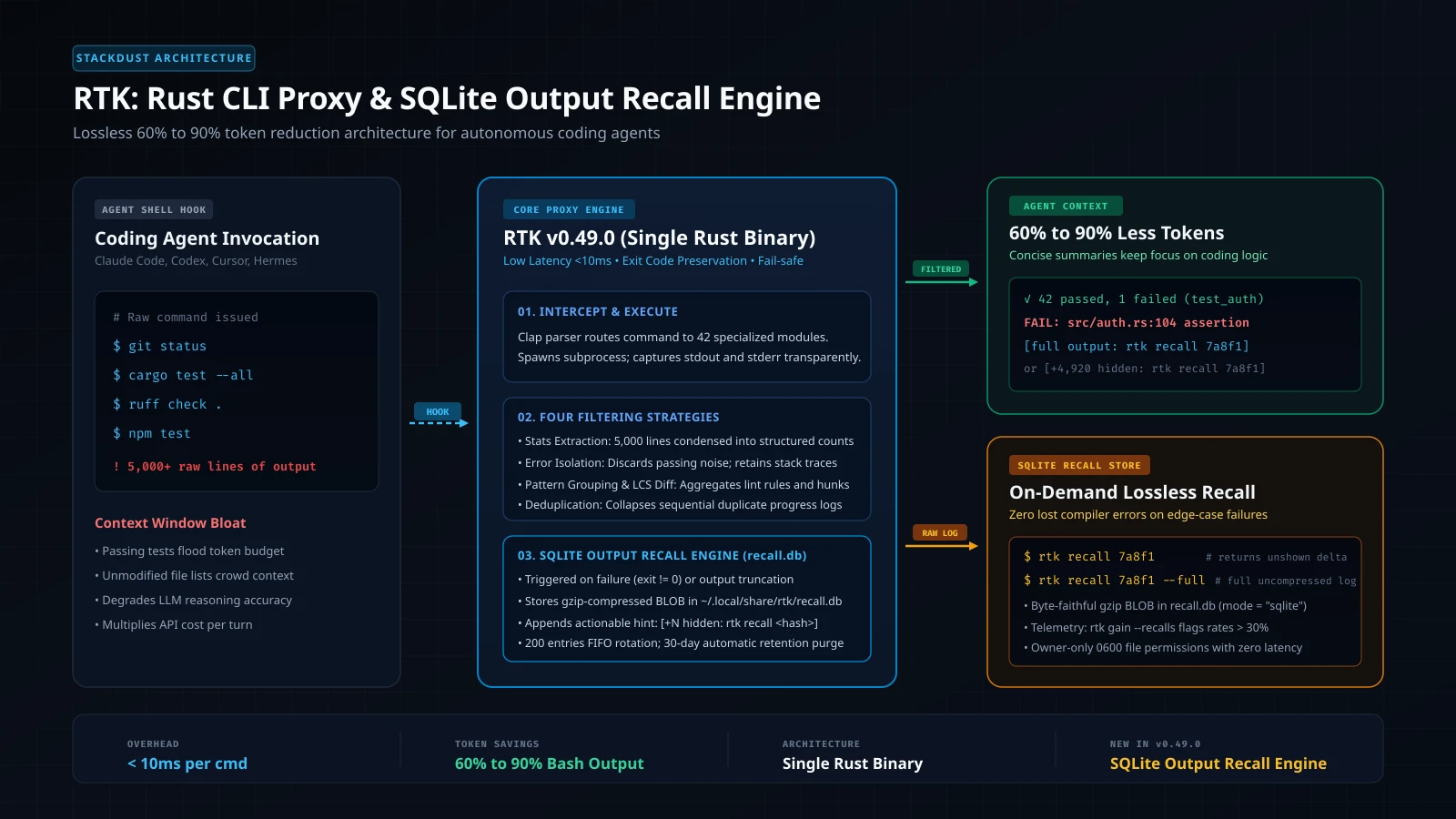
The agent executes a command. The Clap parser extracts arguments, identifies the target utility, and maps it to one of 42 command modules.
RTK spawns the target binary via std::process::Command. It preserves exact exit codes and forwards operating system signals with under 10ms proxy overhead.
Applies domain-specific compression: stats extraction, error isolation, pattern grouping, or deduplication based on the command type.
Compressed output (60% to 90% smaller) returns to the agent context, with an actionable recall hint if logs were truncated or failed.
Raw failure and truncated outputs are stored as gzip BLOBs in ~/.local/share/rtk/recall.db for on-demand delta or full recovery.
The Four Compression Strategies
RTK does not use a generic summarization model to shorten terminal outputs. Doing so would introduce non-deterministic hallucinations and high latency. Instead, it relies on four compiled Rust heuristics tailored to specific developer tools:
1. Stats Extraction
For high-volume informational commands like git status, git log, and pnpm list, the raw output lists every file or dependency path. RTK parses the data stream and condenses hundreds of lines into clean numeric tallies and essential state indicators.
2. Error-Only Isolation
During compilation and testing (cargo test, pytest, go test, vitest), successful test passes provide zero actionable value to a coding agent. RTK discards the verbose log lines for passing test suites, isolating solely the failed test names, panic messages, assertion diffs, and relevant stack traces.
3. Pattern Grouping
Linters such as ruff, eslint, golangci-lint, and sqlfluff often produce repetitive notices across dozens of files. RTK aggregates infractions by rule identifier and file path, showing the developer agent where the violations concentrate rather than repeating identical rule descriptions.
4. Deduplication
Build scripts and test runners frequently print identical progress spinners, warning lines, or network timeout attempts. RTK detects sequential duplicate lines in memory, collapsing them into a single entry with an occurrence counter.
Real-World Compression Ratios
| Command Family | Raw Command Output | RTK Filtered Output | Measured Reduction |
|---|---|---|---|
| Git Status | 200 untracked files listed line-by-line | Structured status summary with modified counts | 90% to 98% |
| Cargo Test | 500 passing unit tests + compiler headers | Test summary count, isolating only failed assertions | 85% to 95% |
| Ruff Check | 150 individual formatting and import warnings | Grouped table of violations categorized by rule code | 75% to 85% |
| System Grep | Unbounded matching lines across minified assets | Truncated line lengths, deduplicated by filename | 60% to 80% |
| Docker PS | Wide horizontal text wrapping across 30 containers | Formatted table retaining Container ID, Image, and Status | 65% to 75% |
How the SQLite Output Recall System Works
Before version 0.49.0, filtering output came with an inherent trade-off. If a compiler output contained an obscure linker warning buried inside passing output, an agent operating on filtered text might miss critical context. The user would have to manually run the command again with verbose flags (-vvv) to diagnose the failure.
The SQLite Output Recall architecture introduced in v0.49.0 removes this trade-off through two deterministic recovery paths:
- Failure-Driven Persistence: When an underlying command fails with a non-zero exit code and the raw output exceeds 500 bytes, RTK’s runner automatically archives the complete standard output and standard error streams into
recall.db. It then emits an actionable hint into the agent context:
[full output: rtk recall 8f2c1b]- Truncation-Driven Persistence: When a high-volume command succeeds but exceeds configured display caps (such as
CAP_LISTorCAP_ERRORS), RTK displays the initial batch and stores the unshown tail inrecall.db, recording the 1-based offset of the first hidden line:
[+3,420 hidden: rtk recall 8f2c1b]Successful commands that fit within display limits are never written to SQLite. This failure-and-truncation design guarantees that routine operations like clean unit test passes or small directory listings do not waste disk write cycles or bloat local storage.
When an agent needs to inspect missing diagnostic details, it issues targeted queries to the recall interface:
# Return only the unshown delta that was elided from context
rtk recall 8f2c1b

# Retrieve the complete raw output log
rtk recall 8f2c1b --full

# Search specifically for panic occurrences within the stored log
rtk recall 8f2c1b --grep "SIGSEGV|panic"

# Slice output starting at line 140 to inspect compiler warnings
rtk recall 8f2c1b --from 140 --lines 25

# List recent entries stored in the local recall cache
rtk recall --list
The database operates entirely on the local filesystem at ~/.local/share/rtk/recall.db under owner-only 0600 permissions. Storage parameters can be configured in ~/.config/rtk/config.toml under the [retriever] section:
mode: Defaults to"sqlite". Can be set to"tee"(legacy individual.logfiles) or"disabled".max_entries: Defaults to200. Once reached, older entries are purged via FIFO eviction.retention_days: Defaults to30. Entries older than 30 days are automatically removed.max_entry_bytes: Defaults to10485760(10 MiB per entry cap).compression: Defaults totrue, storing raw streams as lossless gzip-compressed BLOBs.
Practical Integration: Hooks and Agents
RTK integrates with coding agents through execution hooks. Rather than requiring developers to train language models to type rtk git status instead of git status, RTK configures pre-execution hooks that rewrite commands transparently.
To install RTK across global agents:
# Download and install the pre-compiled Rust binary
curl -fsSL https://raw.githubusercontent.com/rtk-ai/rtk/refs/heads/master/install.sh | sh

# Configure hooks for Claude Code and GitHub Copilot
rtk init -g

# Or configure hooks specifically for Cursor, Hermes, or Antigravity
rtk init --agent cursor
rtk init --agent hermes

# Set recall mode directly from the CLI without manual TOML editing
rtk config recall sqlite
When an agent invokes a bash command, the hook rewrites the execution string in memory. For instance, git diff HEAD~1 becomes rtk git diff HEAD~1. The agent receives the condensed output, preserves its context budget, and maintains high reasoning performance across multi-hour development sessions. If developers need an immediate emergency bypass, setting RTK_RECALL=0 disables recall persistence instantly.
Developers can inspect their aggregate token savings at any time:
# Display savings dashboard
rtk gain

# Inspect recall efficiency to verify how often the agent requested hidden logs
rtk gain --recalls
Economics and Token Counting Nuance
RTK measures output token reductions using an approximation of four characters per token (bytes / 4). While this metric provides an accurate calculation of terminal output reduction, developers should keep architectural economics in mind.
A 90% reduction in bash output does not translate to a 90% reduction in your overall Anthropic or OpenAI API invoice. Total billing includes prompt system instructions, user prompts, cached repository files, and model output tokens. Because bash execution is only one segment of the input stream, the net cost savings on typical coding sessions average between 25% and 50%.
However, the primary benefit of RTK is cognitive rather than purely financial. By keeping terminal logs compact, coding agents avoid context saturation, retain project guidelines more reliably, and complete multi-stage refactoring tasks without getting lost in verbose build artifacts.
Limitations
While RTK provides immediate utility, three structural limitations exist:
- Non-Bash Tool Calls: RTK intercepts shell executions. If an agent uses native API-level file tools (such as Claude Code’s internal file reader or native grep tools), those calls bypass the bash hook. For those operations, developers must instruct the agent to use shell utilities (
cat,rg,find) or explicitrtk readcommands. - Local Disk Retention: Storing raw output in SQLite consumes local storage during extensive debugging sessions. While RTK enforces a 200-entry FIFO ceiling and 30-day automatic retention purge, developers running continuous high-output test loops should periodically inspect
~/.local/share/rtk/recall.db. - Command Specialization: RTK supports over 100 common developer commands across Rust, Go, Python, JavaScript, Ruby, and Docker. However, unmapped or proprietary custom scripts pass through without filtering unless wrapped in
rtk err <cmd>or configured via custom TOML filter rules.
The Broader Context
RTK represents an accelerating trend in the agent infrastructure ecosystem: moving context filtering into compiled local tooling before tokens ever touch an API gateway.
While tools like CUA Driver handle native desktop automation and Graphify replaces probabilistic vector search with deterministic code graphs, RTK tackles the noisy process boundary of the command line.
With the v0.49.0 release, RTK demonstrates that terminal output compression does not have to be an all-or-nothing proposition. By combining sub-10ms compiled Rust filtering with on-demand SQLite recall, developers can give their autonomous agents full terminal visibility without suffocating them in terminal noise.