tinyauth: Lightweight OpenID Certified Authentication Server and ForwardAuth Middleware
tinyauth: OpenID Certified Single Sign-On and Access Control for Homelabs
Securing web services across a private network frequently presents homelab operators with an unpleasant architectural trade-off. Enterprise identity and access management (IAM) suites like Keycloak require heavy Java virtual machine environments that easily consume a gigabyte of memory before handling a single login request. Meanwhile, multi-tier platforms like Authentik require separate PostgreSQL databases, Redis brokers, Celery workers, and web instances just to authenticate a handful of internal users.
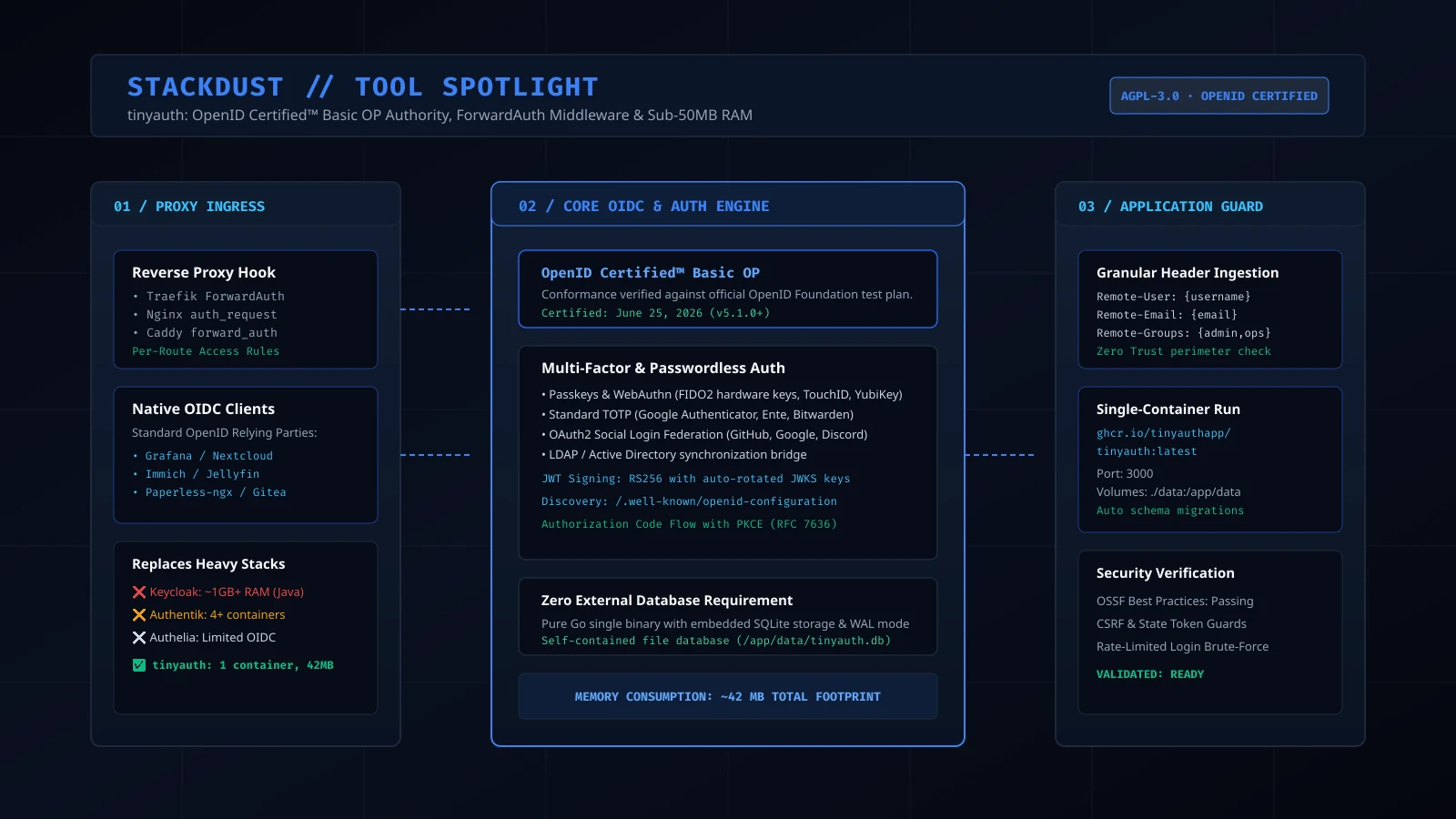
The tinyauth project, developed under the AGPL-3.0 license, solves this infrastructure sprawl. Written in Go as a self-contained static binary with an embedded SQLite engine, tinyauth consumes under 50 megabytes of memory while achieving official OpenID Certified Basic OpenID Provider (OP) compliance.
What It Is
tinyauth is a minimalist authentication and authorization server engineered to secure internal applications and home servers. It operates in dual modes simultaneously: as an OpenID Connect (OIDC) Identity Provider for modern software supporting federated logins, and as a ForwardAuth gatekeeper for reverse proxies protecting legacy services.
Despite its lightweight runtime footprint, the platform includes full modern authentication primitives. It natively supports FIDO2 WebAuthn passkeys, hardware security keys, time-based one-time passwords (TOTP), external OAuth2 identity federation with providers like GitHub and Google, and granular role-based access control (RBAC).
Why You Have Not Heard Of It
Authentication tooling in the self-hosted ecosystem has historically been polarized between two extremes: complex enterprise identity platforms designed for corporate compliance teams, or unmaintained forward-auth scripts that lack formal standard verification.
tinyauth emerged through rigorous open standards engineering rather than corporate hype. In June 2026, tinyauth v5.1.0 completed official certification under the OpenID Foundation Basic OP test plan. This milestone confirmed that lightweight, single-binary identity management can meet the same protocol compliance standards as multi-tier enterprise software.
How It Works
tinyauth separates identity verification into two operational planes: standard OpenID Connect federation and reverse-proxy header injection:
A client accesses a protected endpoint through Traefik, Nginx, or Caddy. The proxy intercepts the request and issues an internal sub-request to tinyauth.
tinyauth inspects the secure session cookie. If unauthenticated, the user is redirected to the login portal for WebAuthn passkey or TOTP verification.
For native OIDC clients (such as Nextcloud, Immich, or Grafana), tinyauth exchanges authorization codes for RS256-signed ID tokens backed by dynamic JWKS endpoints.
For reverse proxy targets, tinyauth returns HTTP 200 with Remote-User, Remote-Email, and Remote-Groups headers, granting immediate authenticated access.
ForwardAuth Integration
Many valuable homelab tools, such as transmission web interfaces, router consoles, or custom developer dashboards, contain either rudimentary authentication or no access controls whatsoever.
With tinyauth, reverse proxies like Traefik (ForwardAuth) or Caddy (forward_auth) route incoming requests to tinyauth before passing traffic upstream. If the user holds an active session, tinyauth responds with HTTP 200 and passes user identities downstream via HTTP headers (Remote-User, Remote-Email, Remote-Groups). This provides unified perimeter protection for internal services such as Vaultwarden or router consoles, while native OIDC clients like Immich exchange standard authorization tokens. Unauthenticated requests are stopped cold at the proxy perimeter.
Embedded SQLite Architecture
Unlike authentication platforms that mandate standalone database clusters, tinyauth embeds SQLite with Write-Ahead Logging (WAL) mode enabled. Schema migrations execute automatically upon container startup. Backing up the entire identity database requires copying a single /app/data/tinyauth.db file, eliminating database connection pooling bottlenecks and network latency.
Comparative Feature Analysis
Identity Platform Resource and Feature Comparison
| Evaluation Metric | tinyauth | Keycloak | Authentik | Authelia |
|---|---|---|---|---|
| Runtime Architecture | Single Go binary | Java Virtual Machine | Python, Celery, Go, Web | Single Go binary |
| Idle Memory Consumption | ~42MB RAM | 900MB to 1.4GB RAM | 500MB to 900MB RAM | ~60MB RAM |
| External Dependencies | Zero (Embedded SQLite) | External Postgres / MariaDB | External Postgres & Redis | Optional external DB |
| OpenID Certified Basic OP | Formally Certified (June 2026) | Certified | Uncertified community OP | Limited OIDC support |
| FIDO2 Passkeys / WebAuthn | Native built-in | Supported | Supported | Supported |
| Reverse Proxy ForwardAuth | Traefik, Nginx, Caddy | Complex plugin setup | Supported via Outpost | Supported natively |
| Container Count | 1 Container | 2+ Containers | 4 to 5 Containers | 1 to 2 Containers |
Running It
Deploying tinyauth requires a single Docker Compose service declaration mapping a persistent data directory:
services:
  tinyauth:
    image: ghcr.io/tinyauthapp/tinyauth:latest
    container_name: tinyauth
    restart: unless-stopped
    ports:
      - "3000:3000"
    volumes:
      - ./data:/app/data
    environment:
      - APP_URL=https://auth.homelab.internal
      - SECRET_KEY=generate_a_random_32_character_hex_key_here
      - LOG_LEVEL=info
      - REGISTRATION_ENABLED=false
To protect a service behind Caddy using tinyauth ForwardAuth, add a directive to your reverse proxy configuration:
app.homelab.internal {
    forward_auth http://tinyauth:3000 {
        uri /api/v1/forward-auth
        copy_headers Remote-User Remote-Email Remote-Groups
    }
    reverse_proxy http://internal-service:8080
}
What It Replaces
tinyauth replaces resource-intensive identity deployments that overwhelm modest homelab hardware. It eliminates the operational overhead of managing dedicated PostgreSQL instances and Redis caches solely for user authentication, while replacing uncertified authentication scripts with an officially validated OIDC engine.
Limitations
- Massive Enterprise Multi-Tenancy: tinyauth is tailored for individual users, families, and engineering teams. Organizations requiring complex multi-tenant realm isolation and hierarchical Active Directory forests with thousands of nested groups will still require Keycloak.
- Custom Scripted Token Transformers: Enterprise tools often permit custom JavaScript execution inside token minting pipelines to rewrite SAML assertions. tinyauth intentionally avoids executing arbitrary user scripts during authentication.
- Federated Identity Brokering Depth: While tinyauth connects cleanly to major OAuth2 providers like GitHub and Google, it does not support legacy WS-Federation or complex Kerberos SPNEGO ticket handshakes.
Who It Is For
tinyauth is ideal for homelab owners, software developers, and small business infrastructure engineers who want resilient, standards-compliant Single Sign-On and passkey security without sacrificing system memory or running complex multi-container databases.
Conclusion
tinyauth demonstrates that software security and protocol rigor do not require enterprise bloat. With official OpenID certification, native WebAuthn passkey support, and a total memory footprint under 50MB, it offers one of the cleanest identity foundations available for modern self-hosted infrastructure.